
Download floAts Mobile Agent – mobile device management, PC control, text messaging, contact management, file transfer, automatic detection
Overview
floAts Mobile Agent is a free utility designed to bridge the gap between mobile devices and desktop computers. By enabling users to manage their smartphones directly from a Windows PC, the application offers a streamlined approach to handling essential mobile tasks without relying solely on the phone’s interface. The primary purpose of the app is to simplify common mobile operations such as messaging, contact management, and file transfers through a more efficient desktop environment. It addresses the limitations of small-screen navigation, particularly when handling lengthy messages or organizing contact lists. The target audience includes users seeking greater productivity and convenience, especially those who spend significant time on their computers and wish to minimize device switching.
Developed by floAts, the application has been available since 2007, indicating a long-standing presence in the mobile management space. Although the software is still in development, it has maintained relevance by offering core functionalities that remain valuable today. Real-world use cases include professionals managing client communications from their desktops, users transferring large files or games between devices, and individuals who prefer the larger keyboard and screen of a PC for contact editing. In the broader app ecosystem, floAts Mobile Agent occupies a niche role as a lightweight, dedicated tool for device integration, emphasizing practicality over flashy features.
Key Features & Functionality
- Manage Text Messages: Users can read and send SMS messages directly from their PC, using a familiar interface similar to email clients like Outlook. This allows for faster typing and better message organization, particularly useful during work hours or when responding to multiple messages.
- Edit Contacts Easily: The application provides a user-friendly interface for adding, editing, or deleting contacts without navigating through the phone’s smaller display. This simplifies contact maintenance, especially for users with large address books.
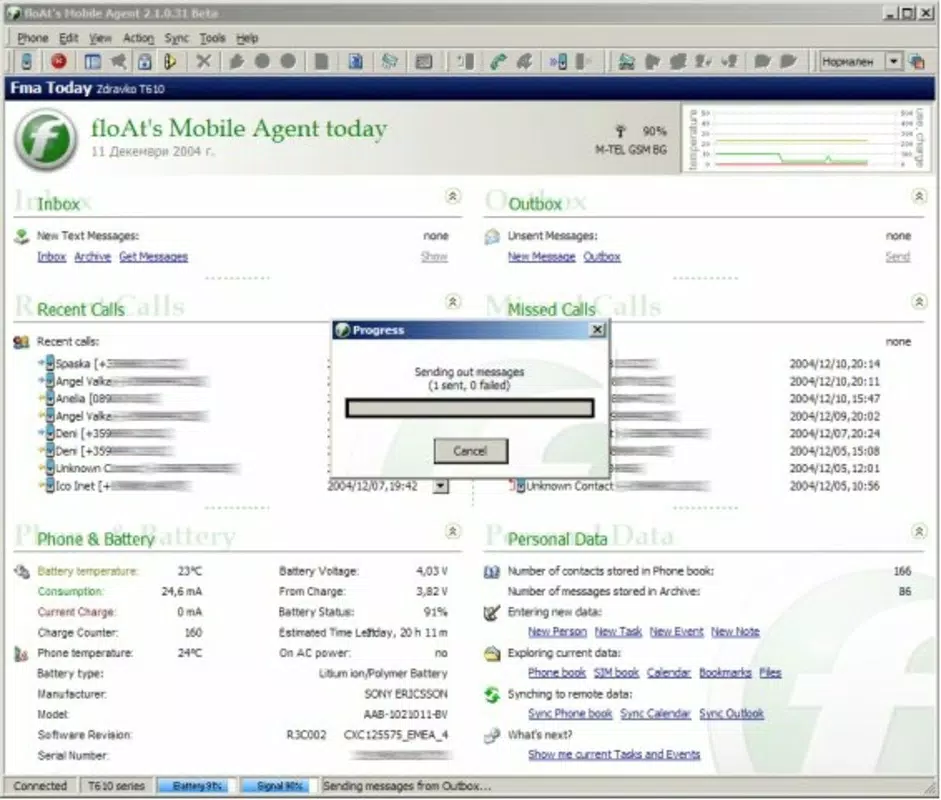
- Access Phone Information: While connected, users can monitor key device metrics such as battery level, signal strength, and temperature. This real-time insight helps in managing power consumption and diagnosing connectivity issues.
- Upload Data and Games: The tool supports transferring files, documents, and even games from the PC to the mobile device. This is particularly beneficial for users who frequently move media or software between devices.
- Automatic Device Detection: Upon connecting the phone via USB, the software detects the device instantly, eliminating the need for manual configuration. This plug-and-play functionality enhances usability and reduces setup time.
Each feature is designed to improve workflow efficiency. For instance, sending a message from a PC during a work session avoids the distraction of switching to a phone. Similarly, editing a contact list on a large screen reduces errors and speeds up the process. These capabilities collectively support a more integrated digital experience between mobile and desktop environments.
Interface, UX & Performance
The user interface of floAts Mobile Agent is built around simplicity and functionality, focusing on core tasks without unnecessary visual clutter. The layout is organized into clearly labeled sections, allowing users to navigate between messaging, contacts, and device status with minimal effort. The visual style is minimalistic, prioritizing readability and ease of access over graphical flair.
Navigating through the app is straightforward, with intuitive controls that require little to no learning curve. The application responds promptly to user inputs, and interactions such as sending a message or uploading a file are executed with consistent speed. Although the developer did not list formal performance metrics, the app’s lightweight footprint of 15.8 MB suggests efficient resource usage.
Performance is expected to be stable on standard Windows systems, particularly those with USB 2.0 or higher ports. Responsiveness may vary slightly depending on the phone model and connection quality. Stability appears reliable for basic operations, though users are advised to ensure their system meets general compatibility standards. The application does not appear to consume excessive CPU or memory during active use.
Platform Compatibility & Technical Requirements
floAts Mobile Agent is designed exclusively for the Windows platform. The current version, 1.1.3, is compatible with Windows operating systems, though specific OS versions were not listed by the developer. The file size is 15.8 MB, indicating a lightweight installation that does not impose significant storage demands.
Compatibility information was not fully disclosed. The developer did not specify minimum OS requirements or hardware prerequisites. Similarly, details about supported phone models or USB protocols were not provided. While the app claims automatic device detection, performance may vary across different mobile devices, particularly older or non-standard models.
Pros and Cons
- Free to download and use, making it accessible to a wide audience.
- Offers core mobile management functions without requiring cloud integration.
- Automatic device detection simplifies setup and enhances usability.
- Supports file transfer, messaging, and contact management from a PC.
- Lightweight design with minimal system resource consumption.
- Compatibility may vary across different phone models due to ongoing development.
- Specific OS requirements were not listed, limiting clarity on system compatibility.
- Limited documentation or user guides were provided.
- App has not been updated recently, raising questions about long-term support.
- Only available for Windows, excluding macOS and Linux users.
FAQ
Is floAts Mobile Agent safe to download and install?
The app is free and available through official channels. However, as with any third-party software, users should ensure they download from trusted sources to avoid potential risks.
Can I use floAts Mobile Agent with any smartphone?
Compatibility may vary depending on the phone model. While the app supports automatic detection, not all devices are guaranteed to work due to ongoing development and limited official support.
Do I need an internet connection to use the app?
No, floAts Mobile Agent operates via a direct USB connection. An internet connection is not required for core functions like messaging or file transfer.
Is the app updated regularly?
The last release was in 2007, and no recent updates have been reported. Users should expect limited future updates and potential compatibility issues with newer operating systems.
Can I transfer games and large files using floAts Mobile Agent?
Yes, the application supports uploading data, files, and games to the connected mobile device. This feature is useful for moving media or software between devices efficiently.
Final Thoughts
floAts Mobile Agent presents a practical solution for users who value seamless integration between their mobile devices and desktops. Its ability to manage messages, contacts, and files from a PC offers tangible benefits in terms of productivity and convenience. While the app is outdated in terms of update frequency and platform reach, its core functionality remains relevant for those seeking a lightweight, no-cost tool for device control.
It is best suited for users with older Windows systems and compatible phones who prioritize direct, local management over cloud-based alternatives. The absence of subscription fees and reliance on a physical connection enhances its appeal for privacy-conscious users.
Despite limitations in compatibility and support, floAts Mobile Agent continues to serve a niche audience effectively. For those needing a straightforward way to manage their phone via PC, the app remains a viable option.
Download floAts Mobile Agent now


